
General Assist Technical Reference
UTY-RVNYN Service Mode Configuration
Operation mode exemptions, temperature limits and room-temperature correction
For qualified technicians configuring the UTY-RVNYN wired remote controller
Overview: Service Mode provides access to controller-level configuration including operation mode exemptions, initial temperature range limits and room-temperature correction.
Important: All Service Mode operations must be commenced within 3 minutes of power-up. In dual-controller installations, configure both controllers with matching parameters unless the application specifically requires otherwise.
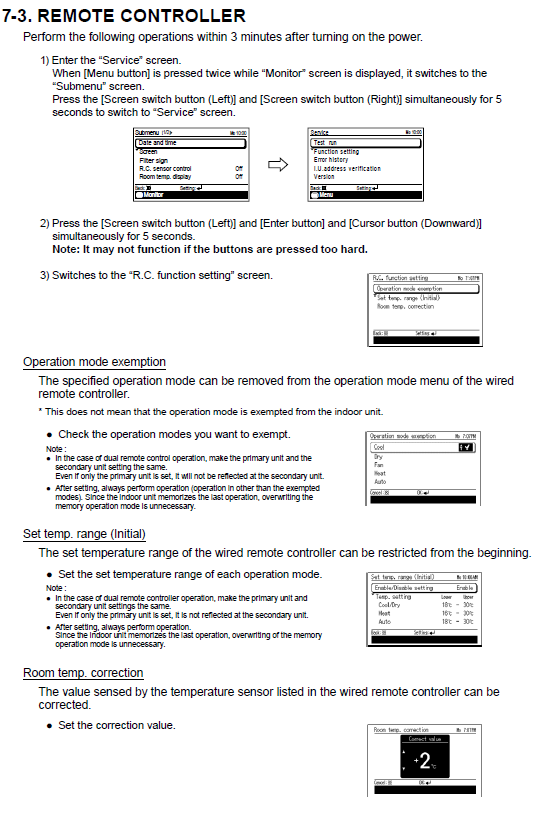
1. Entering Service Mode
Step 1 — Access the Service screen
- From the Monitor screen, press the Menu button twice to enter the Submenu.
- Press and hold both Left and Right Screen Switch buttons simultaneously for 5 seconds.
- The display changes to the Service screen.
Step 2 — Activate R.C. Function Setting
- Press Left Screen Switch + Enter + Down Cursor simultaneously for 5 seconds.
- The screen changes to R.C. Function Setting.
Tip: Apply consistent pressure to all three buttons. Pressing excessively hard may prevent the controller detecting the combination correctly.
2. Operation Mode Exemption
This setting removes selected operation modes, such as Dry or Heat, from the controller's user menu. It does not disable the mode within the indoor unit itself.
| Step | Action |
|---|---|
| 1 | From R.C. Function Setting, select Operation Mode Exemption. |
| 2 | Use the cursor buttons to check or uncheck the operation modes to be exempted. |
| 3 | Confirm the required configuration. |
Dual remote controllers: Apply the same operation mode exemptions to both the Primary and Secondary controllers. The indoor unit retains its last active mode, so no additional memory overwrite is required after operation.
3. Set Temperature Range (Initial)
This function restricts the temperature adjustment range available to the user for each operating mode.
| Step | Action |
|---|---|
| 1 | Select Set Temp. Range (Initial). |
| 2 | Adjust the upper and lower temperature limits for each applicable mode, including Cooling, Heating and Auto. |
| 3 | Press Enter to confirm the setting. |
Once configured, the temperature range remains restricted until it is reconfigured. If dual control is used, apply the same temperature range settings to both controllers.
4. Room Temperature Correction
Room Temperature Correction adjusts the temperature value used or displayed by the controller to compensate for sensor deviation and site conditions.
| Step | Action |
|---|---|
| 1 | Select Room Temp. Correction. |
| 2 | Use the cursor buttons to adjust the correction value as required, for example ±2 °C. |
| 3 | Press Enter to confirm. |
Recommended practice: Use a calibrated thermometer positioned at approximately the same height as the controller sensor when checking room-temperature accuracy. Allow the room conditions to stabilise before applying a correction.
5. Important Notes
- Begin Service Mode configuration within 3 minutes after power-up.
- Service Mode adjustments are stored automatically once confirmed.
- For dual remote-controller installations, configure both controllers consistently.
- Only qualified service personnel should change these settings.
General Assist Technical Reference