
General Assist Technical Reference
UTY-RVNYN Wired Remote Controller
DIP switch settings for memory backup and dual remote controller operation
The UTY-RVNYN wired remote controller uses internal DIP switches to configure memory backup and dual remote controller operation. These settings determine whether controller data is retained during a power interruption and whether the controller operates as the primary or secondary controller in a dual-controller installation.
1. Overview
The UTY-RVNYN wired remote controller includes internal DIP switches used to configure memory backup and dual remote controller operation modes.
2. Switch position
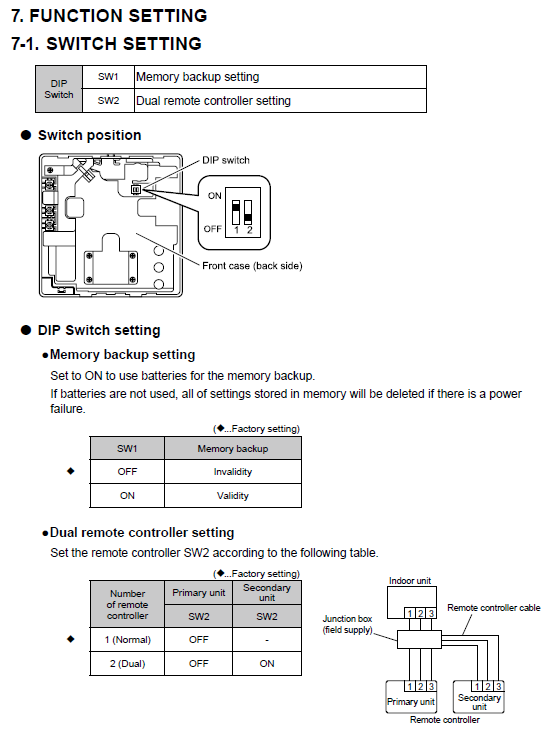
The DIP switches SW1 and SW2 are located on the back side of the front case of the controller.
| Switch | Function |
|---|---|
| SW1 | Memory backup setting |
| SW2 | Dual remote controller setting |
3. SW1 — Memory backup setting
This setting enables the use of batteries for memory retention. If backup batteries are not installed, stored settings will be erased in the event of a power failure.
| SW1 Position | Function | Description |
|---|---|---|
| OFF (Factory setting) | Invalid | Settings are erased if power is lost. |
| ON | Valid | Memory settings are retained using battery backup. |
Important: Install fresh batteries when enabling the memory backup function to reduce the risk of stored settings being lost.
4. SW2 — Dual remote controller setting
SW2 determines whether the controller operates as the primary or secondary controller in a dual remote controller installation.
| Configuration | Controller Type | SW2 Position |
|---|---|---|
| Single controller | Primary | OFF |
| Dual controller | Primary | OFF |
| Dual controller | Secondary | ON |
Quick reference: In a two-controller installation, leave SW2 OFF on the primary controller and set SW2 ON on the secondary controller.
5. Wiring reference
When using dual controllers, connect both controllers to the indoor unit using a junction box (field supply) and polar 3-core cable.
- Maintain correct polarity between terminals 1-2-3.
- Ensure cable length and cable type comply with the applicable wiring specification.
- Do not connect more than two controllers to one indoor unit.
Indoor Unit ─── Junction Box ─── Primary Controller │ └── Secondary Controller
Installation note: DIP switch and wiring changes should only be made with the system isolated. Confirm controller polarity and switch positions before restoring power.
Model: UTY-RVNYN wired remote controller